> ## Documentation Index
> Fetch the complete documentation index at: https://docs.getuntyped.ai/llms.txt
> Use this file to discover all available pages before exploring further.
# Gmail
> Connect your Gmail account to Untyped
## Connect Gmail to Untyped
Click the "Sign in with Google" button on the Untyped sign-in page at [app.getuntyped.ai](https://app.getuntyped.ai).
Choose the Gmail account you want to connect to Untyped.
Untyped will request permission to: - Read your emails and metadata - Access your Gmail labels - Send emails on your behalf (for drafts)
These permissions allow Untyped to learn from your email history and generate personalized drafts. Your data is encrypted and never shared with third parties.
Once authorized, you'll be redirected to your Untyped dashboard where the onboarding process will begin.
## Troubleshooting Gmail Connection
If Untyped isn't syncing or drafting emails, the most common issue is missing Google Account permissions.
**How to fix:**
1. Go to your [Google Account permissions page](https://myaccount.google.com/permissions)
2. Find "Untyped" in your connected apps
3. Make sure the checkbox for **"Read, compose and send emails from your Gmail account"** is checked
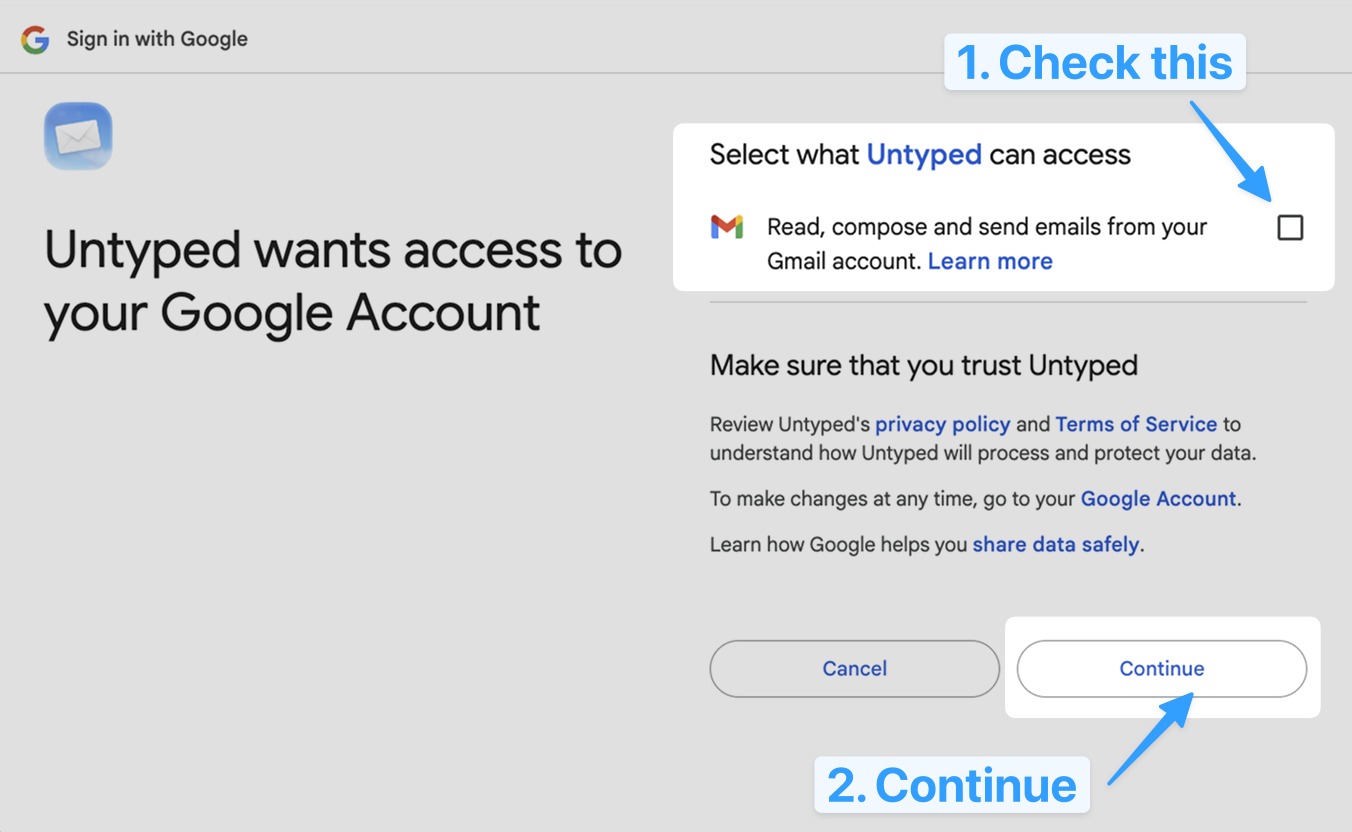 If the permission is unchecked, check it and click Continue. Untyped should start working within a few minutes.
If you see a permission error during sign-in, make sure your Google account allows third-party apps. Go to your Google Account settings and verify that security settings permit app access.
Untyped respects Gmail's native filtering. If you have filters that archive or delete emails automatically, Untyped won't process those emails.
If the permission is unchecked, check it and click Continue. Untyped should start working within a few minutes.
If you see a permission error during sign-in, make sure your Google account allows third-party apps. Go to your Google Account settings and verify that security settings permit app access.
Untyped respects Gmail's native filtering. If you have filters that archive or delete emails automatically, Untyped won't process those emails.